Panoramic Photos on the iPhone

I found a great little app called AutoStitch for the iPhone that came in very handy this week when I wanted to create panoramic views of the displays at the Air Force Museum in Dayton, Ohio.

Click for full size:
Air Force Museum Panorama

Air Force Museum Panorama

The program works by allowing you to take a series of overlapping photos using the iPhone camera and “stitching” them together in one long, panoramic image. While you can find software to accomplish the same effect with more features for your desktop or laptop, I love the fact that you can create and save the panorama directly on the phone.

The only thing holding this $1.99 program back is the limited image quality available to my iPhone 3G camera. However, as you can see from the above examples, impressive results are still available despite the hardware issue.

Science and History: My Geek Mini-Vacation

I took two days off from work this week to spend a little bit of time recharging my geek batteries. Sometimes it’s easy to forget the wonder you can have around technology when you deal with fixing tech issues every day. Fortunately, Ohio has some great geek destinations within driving distance!
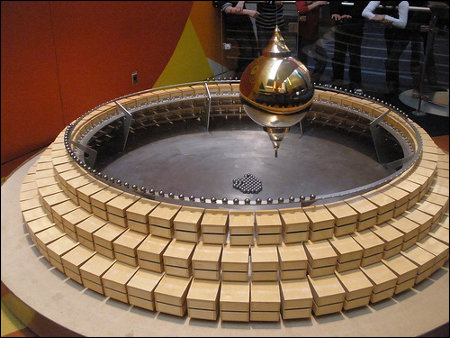
Foucault pendulum clock at COSI

My first stop was at the Center of Science and Industry (COSI), a science museum in Columbus, Ohio. This was the first time I’ve been to COSI since they moved from their cramped little building in the downtown area to the larger area on the other side of the river years ago.

There’s a lot of really great displays of science and technology there, and I really found plenty to interact with over the few hours I spent there. I really liked the “Progress” display and it’s view of life in 1962 from a street level.

You can check out my photos from COSI here.
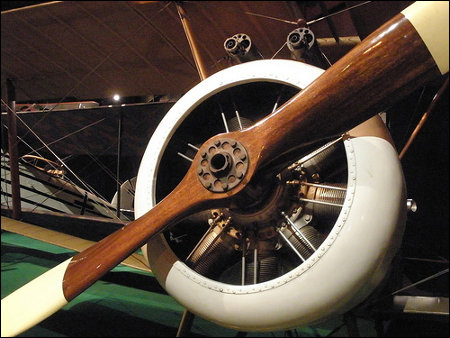
Biplane on display at the National Museum of the United States Air Force

The next day was spent at the National Museum of the United States Air Force, located at Wright-Patterson Air Force Base in Dayton, Ohio. The last time I had visited there was with my parents in the 1980s. Since then, they’ve expanded the museum itself with two other hangers, and are even looking to add a fourth down the line.

The museum catalogs the history of the Air Force from the very beginning of flight all the way to through present day, and it’s pretty awe-inspiring to walk around all those aircraft from every historical period. The hangers are absolutely enormous, with plenty of space for B-52s and other monster planes and helicopters.

You can check out my photos from the Air Force museum here.

There was a lot of walking for me over those two days, and I had a lot to take in thanks to having access to Wikipedia via an iPhone app that allowed me to look up further details into the science or history I was looking at.

I didn’t really end up spending much for the trip, and it really did help to recharge the geek inside, so I’m absolutely glad I took the time!
Another Motherboard to Add to the Pile

AMD ATX Motherboard versus Atom Mini ITX Motherboard
Old AMD ATX Motherboard vs New Atom Mini ITX Motherboard

The old AMD socket 939 motherboard that my Ubuntu Linux file server was running on finally gave up the ghost last week. Because replacements are harder to find for older processors, I decided to try a different router and went with an Intel mini ITX motherboard and Atom 330 processor.

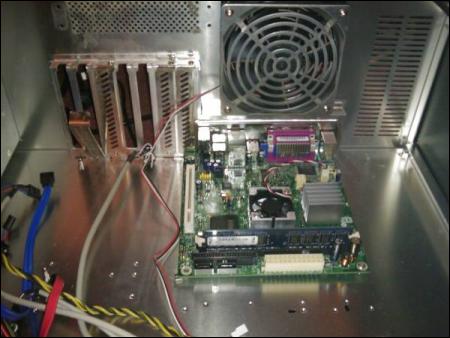
What’s neat is that the heat sink with the fan isn’t cooling the processor, but the northbridge chipset. The actual Atom 330 processor is underneath the fanless heatsink next to it, which tells you just how little power it’s using in comparison.

The Atom Mini ITX motherboard inside the case
Mini ITX Motherboard Inside Case — Lots of Room to Grow

It’s amazing how small this little guy is, especially when compared to the motherboard it’s going to replace. I’d almost go as far as calling it “Mac mini” small. It’s pretty comical to see how much space there is surrounding it in the Rocketfish tower case I had for the box.

So far performance has been good, both from a file serving perspective, as well as trying out general desktop performance under Ubuntu.