
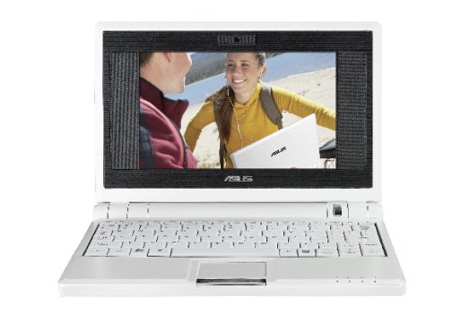
If you’ve been keeping up with currently available notebooks and laptop PCs, you may have noticed the new phenomenon that is netbooks, such as the Asus Eee PC or the Acer Aspire One. Also, Lenovo and Dell have both recently made announcements about their plans for ultra-compact notebooks. “Netbook” is a term often used to describe the new class of ultra-portable and inexpensive subnotebook computers that trade features such as DVD drives for reduced price and size.
I first came across this new class of portable computer when I began to look for a smaller form factor to take with me out into the field.
The idea of a reduced functionality laptop isn’t new, and dates back to
portables such as 1983’s Tandy Model 100. In the 20 years since then, a number of ultaportables have been released, though few caught on due to the premium prices that came with them.
Much of the current interest in netbooks comes from the excitement generated by the One Laptop per Child project’s goals to create a $100 laptop. While the project wasn’t as successful as it hoped, it did compel manufacturers to work on their own inexpensive and ultraportable devices.
The first of these attempts to take off came from ASUS in the form of their Eee PC netbooks released in 2007. The Eee 4G Surf series first came to the US in late 2007, with a sub $400 price point for most variants. Although there were complaints about the tiny keyboard and reduced-resolution screen, the paperback sized device sold better than anyone expected, prompting others to quickly begin work on their own entries.
Current competitors include the MSI Wind PC and the Acer Aspire One, which features the Intel Atom processor and is available at Best Buy for around $350.
While the price and size of netbooks are tempting, it’s still important to consider how you will use the device. If you often use your laptop to watch DVD movies, for example, you’re going to need to invest in an external USB DVD drive. And while the keyboards are improving, they do take some time to get used to and aren’t always the most productivity for long periods of word processing.
From my own experience as an owner of an Asus Eee PC, I’ve come to really like how portable the device is. Instead of a full-sized laptop bag, I can carry the system, complete with charger, USB hard drive and tools, in a portable DVD bag nearly half the size. While the Eee PC works great for most of the on-site troubleshooting tasks I need it for, the small keyboard does slow down my typing speed. I’ve also found the reduced 800 x 480 resolution LCD screen can also sometimes be a problem when surfing web sites for technical information.
Still, having a ultracompact and inexpensive device as a secondary PC does make it an easier decision on whether to take a PC with you when you’re away from the office or off to school. With the number of services available on the Internet, such as Google Docs, using that netbook as an on-the-go machine has really made the devices a solid option for the modern, highly mobile person.

